
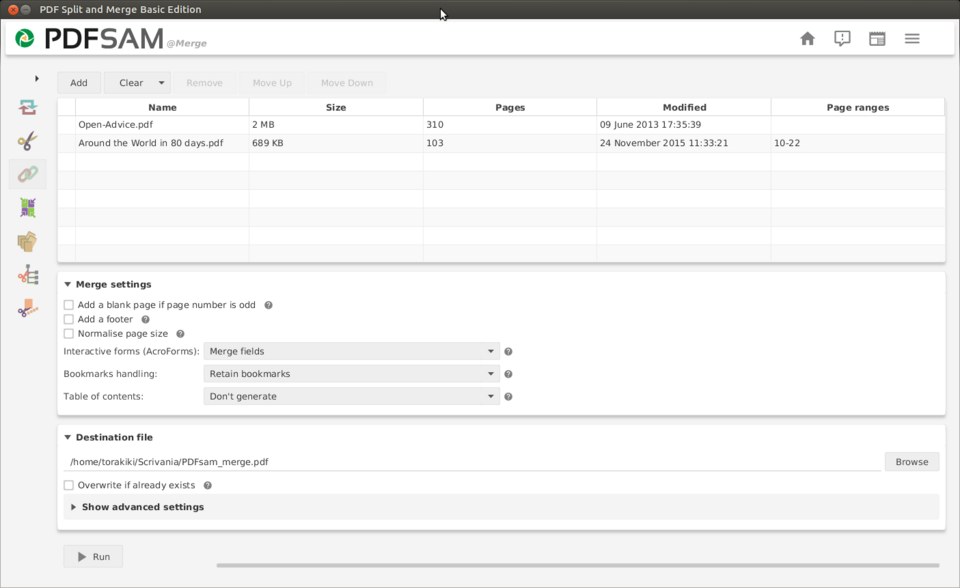
PDFsam Basic is our first choice for ordinary local PDF page assembly. The official project describes a free, open-source desktop application for Windows, macOS and Linux, with operations including merging, splitting, rotating, mixing and extracting pages. Its appeal is focus: you can choose a page-level job without first treating the whole document as an editable layout. This is an editorial preference under our criteria, not a claim that the application wins a speed, privacy or reliability benchmark. It is also specifically Basic; the publisher's other products and trials should not be confused with the free edition discussed here.
A useful first task is assembling a packet from a few documents you own. Write the intended order before adding files: a cover, a short guide and an appendix, for example. If only part of a source belongs in the packet, note the intended pages in a way you can check later. The difference between a page's position in a file and a printed page label can matter. A document whose first sheet is an unnumbered cover may not match the number someone says aloud. This is why a short written specification helps more than assuming that a range means the same thing to every participant.
After creating the output, reopen it in a separate reader. Inspect the first and last pages and the boundaries between sources. Confirm that the expected material is present and that nothing was duplicated or omitted. A matching total is useful but insufficient: one wrong page can replace another without changing the count. These are suggested checks, not results from a comparative test we performed. If the packet includes forms, bookmarks, links or signatures, consult the current documentation and verify the features that matter. Page assembly changes the document's structure, so the right check follows the actual contents rather than an assumption that all PDFs behave alike.
The narrow purpose is also a limitation. PDFsam Basic should not be chosen with the expectation that it will rewrite an existing paragraph, perform OCR or offer every feature of another edition. For a scan that needs searchable text, consider NAPS2 or OCRmyPDF. For a small content correction, the original authoring file or a carefully checked Draw workflow may be more suitable. For visual page organization, PDF Arranger has a strong case. Choosing among them is not a contest over brand recognition; it is matching an operation to a tool whose documented purpose actually includes it. A focused application is useful when the focus matches your need.
Local processing is another practical advantage, with the boundaries described in the introduction. The project states that the page work runs on the computer rather than requiring document uploads. Downloading the software and maintaining the installation are separate activities, and a synchronized destination folder remains a separate sharing choice. We do not turn that product description into an independent privacy audit. Preserve the original, choose an output location you understand and give the assembled file a clear name. A workflow becomes easier to trust when you can explain where its inputs came from, what operation was performed and how the result was inspected.
PDF24 Creator is the strongest competitor for Windows users seeking breadth, while PDF Arranger may win for people who prefer thumbnail-driven organization. We select PDFsam Basic overall for a clear, free, local page-operation workflow across Windows, macOS and Linux. Begin with one modest job and learn the relevant controls from the current official guide. A successful result is a coherent packet you have actually checked, not merely a file produced without an error message. If the task changes, choose again rather than forcing one application to do everything. Would a focused page tool solve most of your PDF work, or do you need a broader toolbox often enough to prefer one?
Sources: Official project resource 1 · Official project resource 2.
Image: Torakiki610 · CC BY-SA 4.0. Historical PDFsam Basic merge module on Ubuntu Mate, 22 May 2017; not the current interface or a test result. Existing optimized image reused unchanged. Original framing retained; resized and converted to progressive JPEG. Original license retained; no endorsement.
