
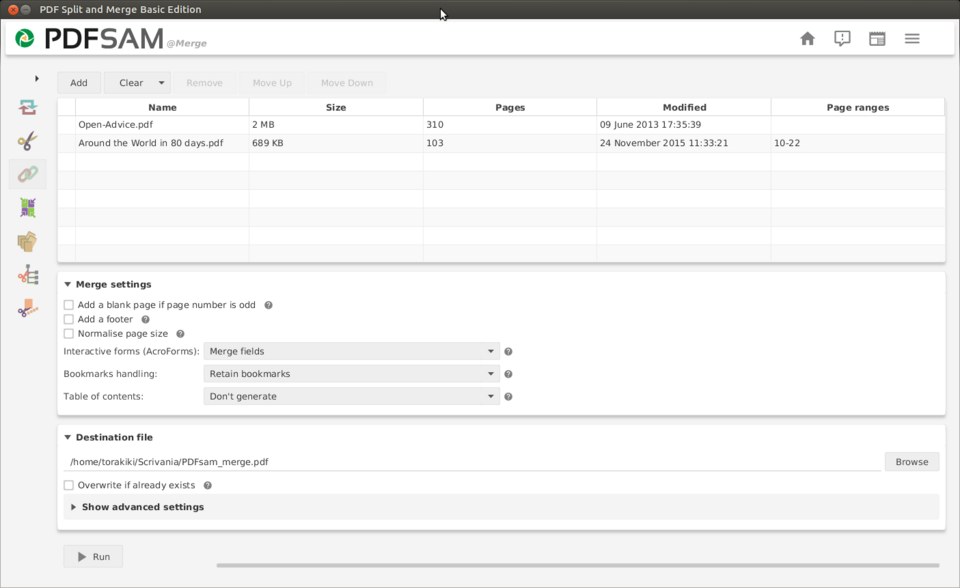
A PDF problem becomes easier when you name the operation before choosing an application. Joining two documents, correcting a page, reading comfortably, adding handwritten notes and making a scan searchable are different jobs. A program that excels at one can be the wrong choice for another. This countdown compares ten free desktop tools for useful local PDF work, with public features checked on 24 October 2026. PDFsam Basic takes first place for straightforward page operations across Windows, macOS and Linux. PDF24 Creator has the strongest rival case for Windows users who want a broader toolbox, while specialist readers and command-line utilities serve narrower needs.
Our editorial order prioritizes a clear everyday job, useful local processing, a manageable route for an ordinary reader and a free core that is more than a time-limited trial. Platform availability and setup effort affect the order. We do not assign invented speed scores, compression percentages or privacy ratings. This is a researched selection based on official documentation, not a laboratory benchmark or a claim that we installed and tested all ten applications. Different tasks can reverse the ranking: NAPS2 may be the better first choice for a scanner, and a technical user may prefer qpdf for repeatable structural work.
“Offline” describes the local document operations discussed here. It does not mean that downloading software, checking for updates, following a link, obtaining OCR language data or using a network feature never needs a connection. A file saved in a synchronized folder can still be uploaded by the synchronization service. PDF24 Creator is a Windows desktop product; its similarly branded browser tools are a different route. PDFsam Basic is distinct from the publisher's other editions. Always start from the official project links and check the current package for your operating system rather than assuming that a familiar name identifies the same product everywhere.
We inspected Google Trends Explore for United States, past 90 days, all categories and web search on 24 October 2026. “merge pdf,” “compress pdf” and “pdf editor” displayed relative averages of 31, 24 and 64. Relevant rising related queries included “how to compress a pdf without losing quality” at +500% and “compress pdf to 20mb” at +250%. These are normalized interest and related-query growth measures, not monthly search volumes or proof that a particular application is best. Unrelated suggestions were excluded. We found no basis for a seasonal claim, and not every tool in this list compresses files or edits existing text.
A useful practice file contains a few pages you own: a title page, a short paragraph, an image and a deliberately rotated page. Define the intended result, preserve the original and save the output separately. Then reopen it in another reader, inspect page order, search or copy a distinctive phrase if relevant, and check any links or comments that matter. These are suggested verification exercises, not reported product test results. Never assume that a visually plausible output preserves every form, annotation, bookmark or signature. Those features need their own checks, especially when the document is important or another person must continue editing it.
Topnilo's free student apps offers broader study software, while account security habits explains a different part of protecting everyday work. Here the focus is choosing the smallest suitable PDF workflow. A local application does not remove the need for backups, careful sharing or truthful document handling. An opaque shape is not a demonstrated redaction, and a drawn signature is not automatically a verified digital signature. For a sensitive or formally signed document, understand the relevant process before modifying it. Which would save you more time: one broad toolbox, or a few focused applications that each do a clearly defined job?
Sources: Official project resource 1 · Official project resource 2 · Official project resource 3 · Official project resource 4 · Google Trends Explore.
Image: Torakiki610 · CC BY-SA 4.0. Historical PDFsam Basic merge module on Ubuntu Mate, 22 May 2017; not the current interface or a test result. Existing optimized image reused unchanged. Original framing retained; resized and converted to progressive JPEG. Original license retained; no endorsement.
